


All posts by Smitty (WB1G)
Fall Campout Update
CAMPOUT FIRE ADVISORY
Updated: 09/17/2026 12:30 PM
Some good news coming in this morning. The area is NOT under an evacuation watch or warning, and the fire did NOT spread beyond the perimeter last night. Logger Campground is open and not threatened, and we are a go for launch.
IMPORTANT: The route referenced on the website is closed to emergency vehicles only. You will need to use the newly refurbished Hobart Mills route.
- Follow I-80 E to Truckee.
- From I-80 E, take exit 188A (CA-89).
This is not the exit for Tahoe, so pay close attention — it’s past the 89 Tahoe exit. - Once you exit CA-89 N, at the roundabout, make sure you’re headed towards Sierra County.
- Make a right on Hobart Mills Rd.
- It curves a bit and joins Dog Valley Rd.
- The address for Logger Campground is 26104 Dog Valley Rd, Truckee, CA 96161
If you use your navigation, DO NOT USE APPLE MAPS AS IT WILL TAKE YOU THE WRONG WAY. Google Maps will give you the option to take the above route. A map of the route can be found below:
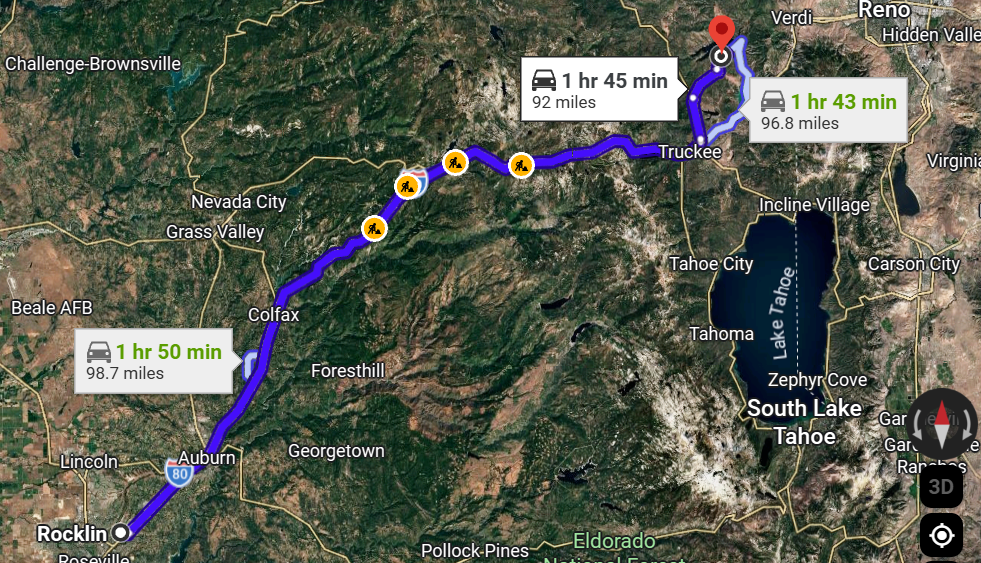
We’ll continue to stay in contact with the county sheriff and CHP Truckee, keeping a close eye on how fast the fire is moving, which direction it’s headed, and how containment is coming along. We’ll also provide updates on the QST crawler on http://www.w6ek.org.
If you’d like to follow along yourself in the meantime, Watch Duty is the best place to watch this one — they post updates faster than anyone else. Here’s the incident page: https://app.watchduty.org/i/120733
73,
Smitty (WB1G) | Fall Campout Chair
Amateur Radio Exams / VE Testing: October 5th, 2026
Amateur Radio Exams / VE Testing: October 5th, 2026
 Looking for a local, comfortable, friendly, and inviting atmosphere to help you successfully pass your ham radio exam? Sierra Foothills Volunteer Examiner Team provides monthly in-person exam sessions with mentors on hand to answer your questions about equipment, local resources, clubs, and events. You’ve successfully passed your ham radio exam, now what?
SFARC Elmers are here to help and guide you!
 The Sierra Foothills VE team offers many scholarships. Free exams and Free FCC licenses for all students, youth, and young adults ages 25 and under! Military and First Responders receive a 50% discount on exams!
For more information and to pre-register for an upcoming session, CLICK HERE.
NEXT IN-PERSON DATE: October 5th, 2026 @ 7 PM
Fox Hunt > Equipment
WHAT KIND OF EQUIPMENT DO I NEED?
 The popular RDF (radio direction finder) techniques used by SFARC include:
A version of the Handi-Finder created by Doug (W2VX) and Greydon (KC6SLE). This device switches between two dipole antennas, effectively measuring the TOA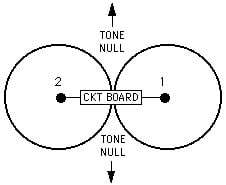 (time of arrival) that appears as a tone on the HT (handi-talkie). As illustrated on the right, the tone will be null (i.e. minimum volume) when the antennas are equidistant from the hidden transmitter, thereby providing a vector to/from the hidden transmitter once several bearings or vectors have been established and plotted on a map the location of the Fox can be estimated. Mike (K6YMM) presentation on the technique can be found here.
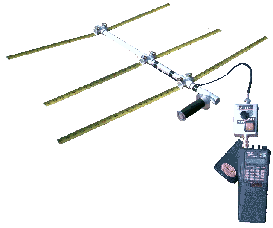 Growing in popularity is the Tape Measure Yagi with a variable attenuator (step attenuator or an offset attenuator). The directional nature of a Yagi enables hunters to point straight at the hidden transmitter. As the Fox Hunter approaches the Fox, attenuation is required (otherwise the HT will be overloaded, and the S-meter will not show a peak).
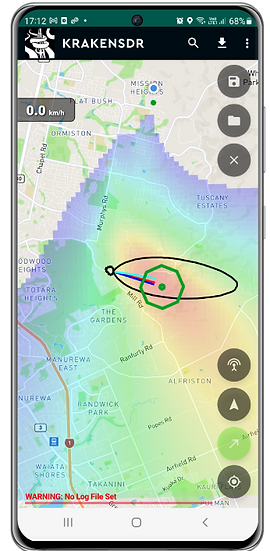
The club continues to explore other RDF technologies. Most recently, testing the KrakenSDR, which uses five coherent receivers feeding data into a Raspberry Pi running the MUSIC (Multiple Signal Classification) algorithm. MUSIC is able to estimate DOA (direction of arrival) and, together with an Android phone, displays a heat map and a vector straight to the hidden transmitter!
CRAWLER
Google ReCaptcha 3.0 (Page)
Google reCAPTCHA v3 is a free bot-detection service that protects websites and apps from automated abuse — spam signups, credential-stuffing logins, scraping, fraudulent checkouts, and similar attacks. Its defining feature is that it is invisible: unlike the familiar “I’m not a robot” checkbox or the “click all the traffic lights” image puzzles, reCAPTCHA v3 never interrupts the user. Instead of asking visitors to prove they’re human, it quietly analyzes their behavior in the background and hands your server a risk score to act on.
The core idea: a score, not a challenge
Every time a protected action happens on your site — a page load, a form submission, a login — reCAPTCHA v3 evaluates the interaction and returns a score between 0.0 and 1.0:
- ~1.0 Looks very likely human (low risk).
- ~0.0 Looks very likely automated (high risk).
Crucially, reCAPTCHA v3 does not make a decision for you. It doesn’t block anyone on its own — it reports a risk signal, and you decide what to do with it. Google recommends starting with a threshold of 0.5 and tuning it based on your own traffic.
How the scoring works
reCAPTCHA v3 loads a small JavaScript library on your pages. As visitors browse, it observes a range of behavioral and technical signals and feeds them into a machine-learning model that Google has trained on enormous volumes of human and bot traffic. The model returns the probability that the behavior matches a genuine human.
The system also learns from your specific site over time. Because of this, scores in a staging environment or in the first days after you install reCAPTCHA may differ from the more accurate scores you’ll see once it has observed real production traffic.
“Actions”: context-aware scoring
reCAPTCHA v3 introduces a concept called actions. You tag each important interaction with a label — for example login, signup, checkout, or comment. This lets Google’s risk engine learn the normal behavioral patterns for each context separately, since abuse looks different on a login page than it does on a comment form. Tagging actions also gives you a breakdown of your top actions in the admin console, so you can monitor where suspicious traffic is concentrated.
Why server-side verification matters
A complete reCAPTCHA v3 setup has two halves:
- Client side: The JavaScript runs in the visitor’s browser and generates a short-lived token (valid for about two minutes).
- Server side: Your backend sends that token to Google’s verification endpoint, which returns the score along with the action name, a timestamp, the hostname, and a validity flag.
Verifying on the server is essential — never trust the client alone. When you verify, you should confirm that the action name matches what you expected (a login token should come from your login page) and check the timestamp to guard against replayed tokens. A mismatch can indicate someone trying to forge requests.
How you respond to the score
Because reCAPTCHA v3 only scores and never blocks, you design the response logic yourself. Common patterns include:
- High score: let the user proceed normally.
- Medium score: add a light verification step, send a submission to moderation, or apply rate limiting.
- Low score: require additional verification such as email confirmation, a one-time passcode, multi-factor authentication, or a fallback reCAPTCHA v2 image challenge.
A widely used deployment runs reCAPTCHA v3 as the silent primary layer and only escalates to a v2 challenge when the score is low. The general advice is to act in the background rather than hard-blocking, because treating the score as a simple allow/deny switch tends to lock out legitimate users and produce a high false-positive rate.
How it differs from reCAPTCHA v2
reCAPTCHA v2 relies on a visible challenge — the checkbox, and sometimes an image puzzle when traffic looks suspicious. reCAPTCHA v3 removes that friction entirely and replaces the yes/no challenge with a continuous risk score. The trade-off is that v3 requires more thoughtful integration: you have to choose thresholds, define actions, and build the logic that decides what each score means for your site.
Practical considerations
- Tuning is required. The default 0.5 threshold is only a starting point. Watch your admin console and adjust per action based on real traffic.
- Some legitimate users score low. Fast power users, people on VPNs, and privacy-focused visitors can be flagged as suspicious, so avoid relying on a single hard threshold.
- It’s a layer, not a silver bullet. reCAPTCHA v3 catches simple bots well, but increasingly sophisticated automation can mimic human signals. It works best as one part of a broader security strategy.
- Privacy and consent. reCAPTCHA v3 collects information such as IP address and browser/interaction data and uses cookies or browser storage. If you operate under GDPR or similar regulations, you should review your consent requirements and data-processing obligations before deploying it. (This summary is informational and not legal advice — consult a qualified professional for your jurisdiction.)
In short
Google reCAPTCHA v3 is an invisible, score-based bot-detection system. It watches how visitors interact with your site, returns a 0.0–1.0 risk score for each protected action, and leaves the decision of how to respond entirely up to you. Done well, it protects forms, logins, and checkouts without ever making real users solve a puzzle.
Web Help (Page)
TRAINING VIDEO LIBRARY
#1 PROCESSING ORDERS
#2 ADD AND EDIT POSTS
#3 ADD THE NEWSLETTER TO THE WEBSITE
#4 SENDING EMAILS TO THE CLUB GENERAL MEMBERSHIP AND/OR FRIENDS OF SFARC LIST(S)
#5 ACCESS YOUR w6EK.ORG EMAIL ACCOUNT ON YOUR SMARTPHONE
#6 ACCESS YOUR w6EK.ORG EMAIL ACCOUNT BY WEBMAIL
#7 ORIGINAL TRAINING SESSION ON ZOOM
#8 2026 TECH SUMMIT
EMAIL FOOTER
73,
The Sierra Foothills Amateur Radio Club (W6EK)
(530) 492-0920
SFARC Privacy Policy: The Sierra Foothills Amateur Radio Club takes CCPA seriously and does not sell or share your personal information (ie: name, call sign, or email) with anyone. Your information is used for the sole purpose of communicating club activities and events.
Website: www.w6ek.org
Group.io: groupsio.w6ek.org
Social:
facebook.w6ek.org
twitter.w6ek.org
linkedIn.w6ek.org
instagram.w6ek.org
youtube.w6ek.org
NEED HELP FROM THE WEB TEAM
UNSUBSCRIBE (Page)
We’re sorry to see you go.
Please provide us with your name and email address and we’ll confirm your removal by email.
Downloads (Page)
1
e1c60faa92
0
Advancement File Library (Page)
1
e1c60faa92
0